

One day I returned home only to find that our Sony Wega TV (Model KV34HS420) was no longer working. It would respond to the remote control and begin to start to turn on, but then it would make a clicking sound and turn itself off before a picture appeared on the screen. After that, the standby/timer LED would continue blinking 6 or 7 times. This blinking LED is a diagnostic code, but its description of the potential issue provided little value. After reading a few dozen postings on the issue, a pattern began to emerge that made me hopeful that I could repair it myself.
We purchased this TV in 2005 while the jury was still out about which flat panel TV technology would eventually replace the tried-and-true CRT technology. Back then, the LCD and plasma flat panel displays still had viewing angle and reliability issues and cost 2 or 3 times as much as an equivalent-sized CRT model and so we just decided to replace our 15-year-old Sony CRT TV with a modern HD-capable CRT TV. I was hoping to get 15 years or more out of this $1500 investment before having to send it to the landfill. After all, this was a SONY, not some no-name brand that I’d expect to fail after only a few years. And tube TVs usually last a very long time. I have one in my basement I purchased in 1985 that is still working fine.
This TV has excellent picture quality and no restrictions in viewing angle, and other than its size and weight, I found it much better than what was available with flat panel technologies at the time. Its speakers provide excellent sound quality, much nicer than the tinny sound produced by some of the razor-thin flat panels. It sits in a corner and therefore takes up no more room than an equivalent size flat panel display. So, after only 6 years, I was wondering whether it would need to be replaced or if I could fix it. After a fair amount of forum reading, I found that this 6 or 7 LED blink code was a rather common problem, along with a common solution, namely to replace the MCZ3001DB integrated circuits known as IC8002 and IC6501 on the ‘D’ board. This chip is functionally identical to earlier versions of it known as MCZ3001D or MCZ3001DA. The forums had many people describing their success at making the repair, but pictures of this procedure were non-existent, hence the reason for this blog posting. Also, the level of difficulty and amount of work involved was not clearly described, so I hope to explain and show what I did so the reader can determine whether it is within his or her skill level to attempt this repair.
This TV weighs 200 lbs. I didn’t want to have to move it from its stand. Fortunately, it was possible to remove the entire back shell simply by removing all of its screws and sliding it off. There are a lot of screws, about a dozen around the periphery of the TV along with several more on the back panel, but fortunately, it’s a one-person job although it wouldn’t hurt to have a helper because the shell, although fairly lightweight, is bulky. Removing the shell allows access to the ‘D’ board.
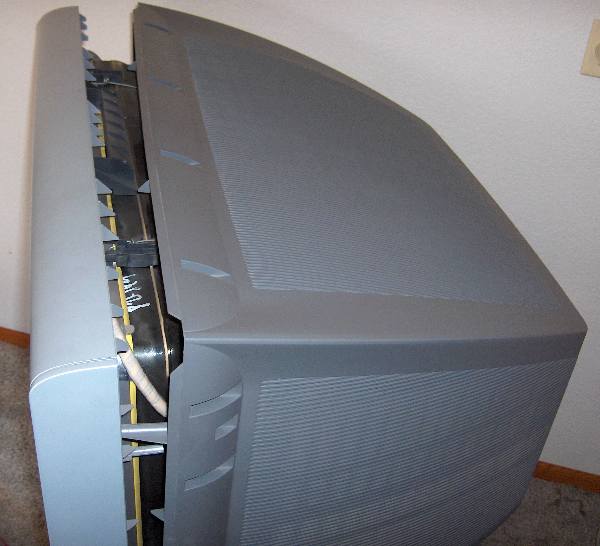
After removing about a 17 screws, the rear shell can be slipped off.
The ‘D’ board is the one shown in the picture below. I should mention that before removing the cover, you must unplug the TV and give it a few hours for the high voltages to dissipate so as to avoid shock hazards. It’s best to unplug it and wait overnight, since if the TV is not working so there’s no need for it to remain connected to power.
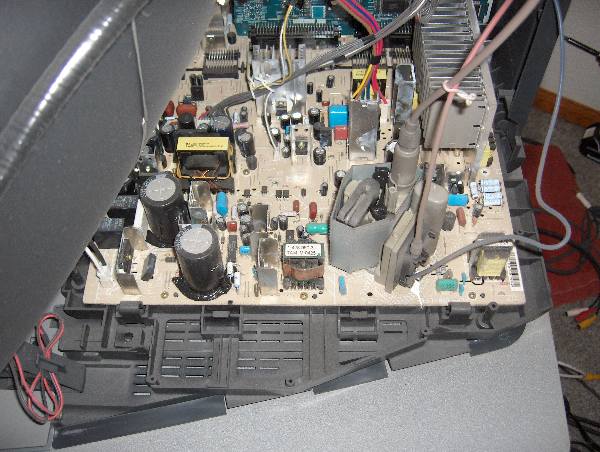
The 'D' board shown above is held in with about 8 screws.
It wasn’t clear how to remove the board, or if it would be necessary to undo all of the wiring connections. Some of the connectors were easy to remove, but the 3 high voltage wires that connect to the CRT did not have easy-to-unplug connections. I eventually figured out that I didn’t need to remove those wires at all. There are a number of connectors that need to be flipped upward to disconnect the ‘D’ board from an adjacent board. It wasn’t clear at first how they worked, but if you feel around for a flange you can pull them upward, they’ll unsnap and pivot up 90 degrees like a draw bridge. Two of the connectors had latches on them that require squeezing the lever to unlatch it before they will come out. I unplugged all the other cables I could find, removed about 8 screws, and the board came out far enough to let me rotate it into a position where I could access the bottom of the board. It was necessary to use a stubby screw driver to remove one screw that was far forward, hidden between two connectors, and just under the CRT. To make that easier, you will notice that there are two plastic hooks, one on each side of the tray that the boards are mounted to that you can unlatch which allows all the PC boards to slide back about 4 inches. That makes the front screw easier to access, although you’ll still need that stubby screwdriver. (I’ve since added images of the latch and the board slid back at the end of this article.) After you get all the screws out, the board is still held in by a few plastic clamps on the edge which you can bend back a little to release the board. The board was still tethered by the high voltage connections, but I was able to fix it ‘in place’, by turning it over like shown in the image below.
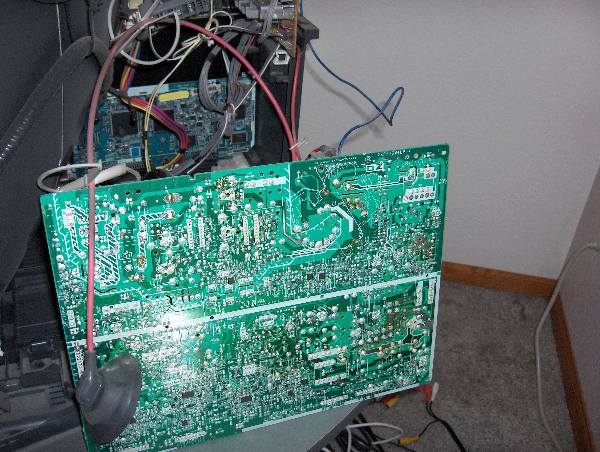
Bottom of Sony 'D' board shown rotated in repair position. Note, it's not necessary to disconnect the wire with the suction-cup-like insulator on it.
Unsoldering the two ICs is not difficult if you use a spring loaded solder sucker like the one shown below. Do not waste your time trying to use solder wick or a bulb-type solder sucker for desoldering the chips. Search for YouTube videos with the word ‘desoldering’ if you’ve never desoldered a chip before to see how it works. Also, make sure that the soldering iron is a low-wattage type, and not too hot to avoid lifting the copper traces.
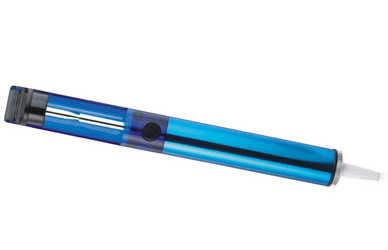
A spring loaded solder pump/sucker like this one works best to remove the solder.
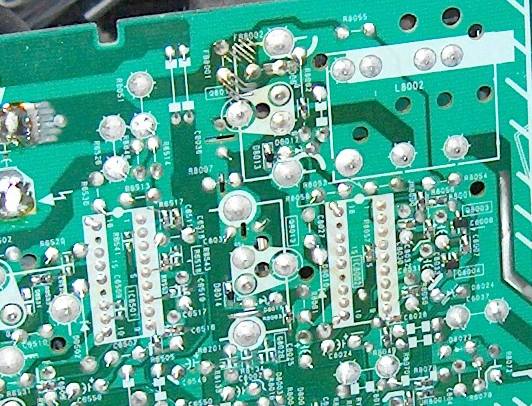
Close up of IC6501 and IC8002 from bottom of board. Note each IC has two unsoldered pins.
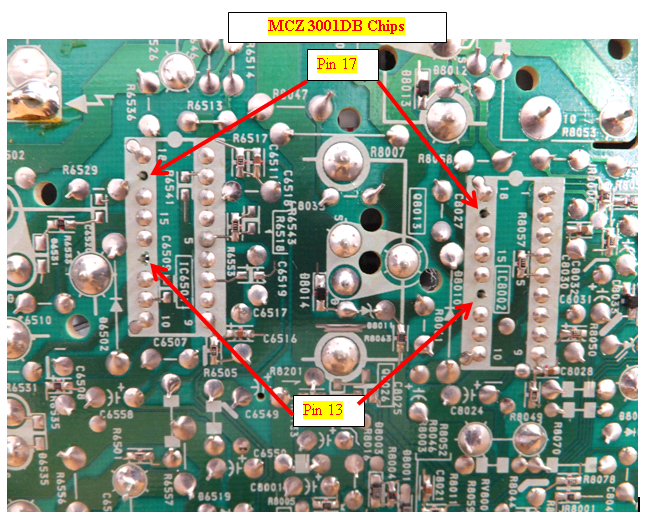
Do NOT solder pins 13 or 17. If you're using a socket, it would be best to clip the legs in those holes off the socket.
Be aware that each chip has two pins are not soldered to the board. This is normal and so don’t try to solder those pins or the fix will not work. Take note of the orientation of the chips since there is a notch on one end facing the closest edge of the board. You do NOT want to install the chips backwards. Also, don’t solder the new chips in directly to the board. Use sockets in case you ever need to do this repair again, since having to unsolder these chips is most of the work. If they were socketed in the first place, you could replace them without having to solder or even having to remove the D board.
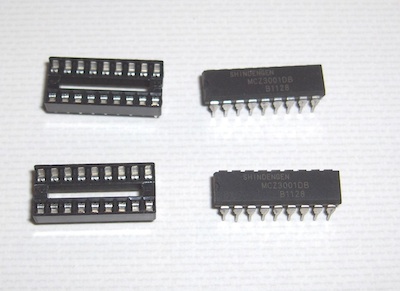
I wasn’t sure of the best way to purchase the ICs, since forum participants mentioned purchasing them on Ebay, where there are several China-based vendors offering MCZ3001DB chips but the shipping times from China vary considerably and can take from 10 days to 3 weeks. The vendor I chose was TriState Module because I wanted a U.S.-based company. They sent me a pair of ICs for around $20 including shipping charges. However, they no longer have these parts in stock and they are getting harder to find. I also needed a pair of 18-pin dip sockets which I found at the local Radio Shack for $.59 each. They look like the parts on the left in the image below:
After replacing the ICs with sockets, you’ll need to install the replacement ICs. Odds are that only one of the chips is bad, but since you won’t know which one, it’s best to just replace them both. It is necessary to squeeze the pins together to get the legs aligned with the holes in the sockets. This style of IC has its legs spread out by default, and so they won’t automatically align unless you pre-bend them inward just a little to align with the holes in the socket. Carefully examine the chips after you install them to make sure all the legs made it into the socket and that the little half-circle notch at the end of the chip is facing toward the near edge of the board as shown in the photo below.
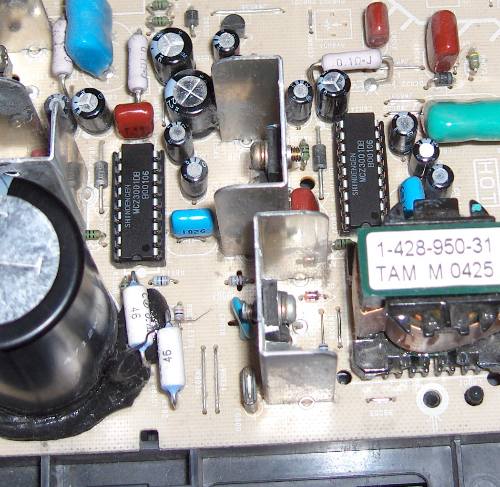
IC8002 and IC6501 installed in their new sockets.
After re-installing the board and attaching all the cables, it would be a good idea to test it to make sure the repair worked before reinstalling the cover. If you unlatched the tray and slid the boards back to make access easier, you’ll need to put them back in position or else the remote control and on/off button won’t reach the board. With luck, your TV will be back up and running, avoiding a premature trip to the landfill. I can’t guarantee this fix will work for you, but the consensus on the forums is that it frequently fixes the 6 or 7 blink code problems on the Sony Wega flat screen CRT models.
I found the repair to be of intermediate difficulty, and the result was very gratifying when the TV turned on again. Our TV has now been working like new for more than 2 years, and if it ever happens again, I could fix it more easily thanks to the sockets that are installed. It felt good to resurrect a TV that has great picture and sound quality and, hopefully, a lot of life left in it.
And, in the event it doesn’t work for you, then maybe getting one of those new and improved flat panel TVs is your best alternative. 🙂
[UPDATE 2013-11-15] I mentioned earlier about the difficulty of finding and removing one of the screws under the CRT. Some of these TVs, including the model I repaired, have a set of latches that allow you to release the board and carrier and slide it back about 4″ to make that screw much easier to access. You can see it in the images below:
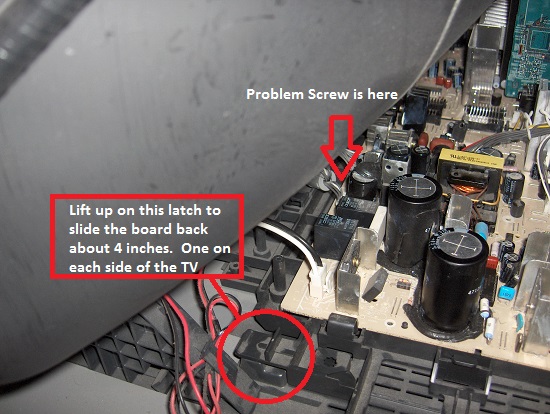
The D-board and its carrier have latches on both sides that can be lifted to slide the assembly backward about 4 inches.
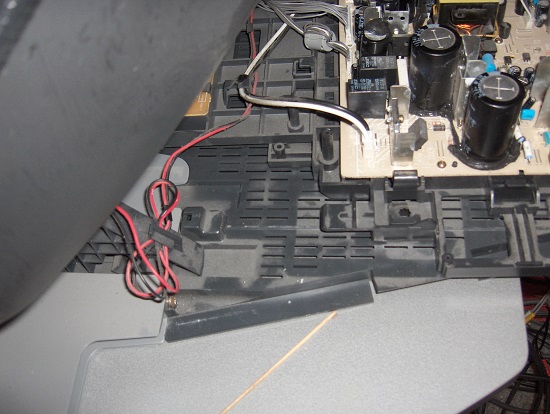
D-board slid back 4″ into the repair position.
Unplug It for Five Minutes
Following the restoration of power to my home after a three hour outage, my KD-34XBR960 would not turn on. The LED blinked repeatedly from 3 blinks to 20 blinks on different attempts to turn on the TV before the TV turned itself off. After reading this web site, I was preparing to replace the ICs on the power supply board and I decided to try one more maneuver before proceeding with the repair.
It occurred to me that the failure of the TV to turn on must have something to do with the power restoration and perhaps had nothing to do with failed ICs. Perhaps the TV’s start up program had been modified by a power surge and thus the TV could not turn itself on. I decided to see if I could reset the startup software in the TV and restore the startup Program by unplugging the TV from the wall outlet for five minutes. I did this and when I plugged the TV back in and turned it on it completed the startup and came on normally as it had done reliablly for several years prior to the problem hat had occurred.
While many startup problems may be the result of ICs that have failed, some problems probably result from the TV’s start up program having been jumbled and unplugging the TV will reset it. This may not restore normal operation in all instances, but it is a simple no risk procedure to try before pulling the TV apart to replace the ICs
Hi Lee (and all),
First of all, thanks for posting such a detailed set of instructions (whether i fix my TV or not!). I started the job tonight and managed to remove the old IC’s. After the work, I noticed something I may have screwed up. If you look at your close-up picture above of IC8002, you can see something on the right hand side labeled R8057. Between the two tiny solder joints there is something extremely small (maybe a resistor?). I just noticed it is missing on my board. I can only assume that, in my attempts to remove the old IC’s, I accidentally heated the solder near it and it fell off. Weird that IC6501 also has a similar setup (see picture above, labeled R6541) but nothing soldered between the two joints. Any thoughts? Did I just make this behemoth a boat anchor?
Thanks,
Paul
Hi Paul, It’s hard to know if the missing resistor will cause problems or not, so it’s probably best to fix it before you get everything back together. The part you’re describing is a 13 k-ohm resistor that should be connected between pin 5 of IC8002 and the groundplane. The IC6501 has the same resistor between pin 5 and ground, but it’s to the right of the chip. I’d recommend finding a through-hole resistor of about the same value and solder it between pin 5 and ground. It’s a common way to replace an SMT resistor if you’re limited to using through-hole components. You’ll have to fold up the legs so they reach the same locations, but any ground point would work so you’re not limited to using the ground pad that the SMT resistor used. Ideally, you can find a 1/8 watt version which will be the smallest through hole resistor size, but you could get away with using a 1/4 watt rated resistor if it’s easier to find.
Thanks Lee, I actually managed to dig up the service manual for the TV which gave the part number for R8057 which I have ordered from Sears Parts Direct for $6. Probably more expensive then your solution above but will work just the same, I presume.
Thanks!