Lee's personal website, blog, and FAQ's
RSS icon Email icon Home icon
  • Fixing a Sony Wega with a 6 or 7 blink code

    Posted on May 18th, 2011 Lee Devlin 161 comments

    A few weeks ago I returned home only to find that our Sony Wega TV (Model KV34HS420) was no longer working. It would respond to the remote control and begin to start to turn on, but then it would turn itself off before a picture appeared on the screen. After that, the standby/timer LED would continue blinking 6 or 7 times. This blinking LED is a diagnostic code, but its description of the potential issue provided little value. After reading a few dozen postings on the issue, a pattern began to emerge that made me hopeful that I could repair it myself.

    We purchased this TV in 2005 while the jury was still out about which flat panel TV technology would eventually replace the tried-and-true CRT technology. Back then, the LCD and plasma flat panel displays still had viewing angle and reliability issues and cost 2 or 3 times as much as an equivalent-sized CRT model and so we just decided to replace our 15-year-old Sony CRT TV with a more modern HD-capable CRT TV. I was hoping to get 15 years out of this model as well before having to send it to the recycler.

    This TV has excellent picture quality along with no restrictions in viewing angle, and other than its size and weight, I found it much better than what was available with newer technologies at the time. It sits in a corner and therefore takes up no more room than an equivalent size flat panel display. So, after only 6 years, I was wondering whether it would need to be replaced or if I could fix it. After a fair amount of forum reading, I found that this 6 or 7 LED blink code was a rather common problem, along with a common solution, namely to replace the MCZ3001DB integrated circuits known as IC8002 and IC6501 on the ‘D’ board. The forums had many people describing their success at making the repair, but pictures of this procedure were non-existent, hence the reason for this blog posting. Also, the level of difficulty and amount of work involved was not clearly described, so I hope to explain and show what I did so the reader can determine whether it is within his or her skill level to attempt this repair.

    This TV weighs 200 lbs. I didn’t want to have to move it from its stand. Fortunately, it was possible to remove the entire back shell simply by removing all of its screws and sliding it off. There are a lot of screws, about a dozen around the periphery of the TV along with several more on the back panel, but fortunately, it’s a one-person job although it wouldn’t hurt to have a helper because the shell, although fairly lightweight, is bulky. Removing the shell allows access to the ‘D’ board.
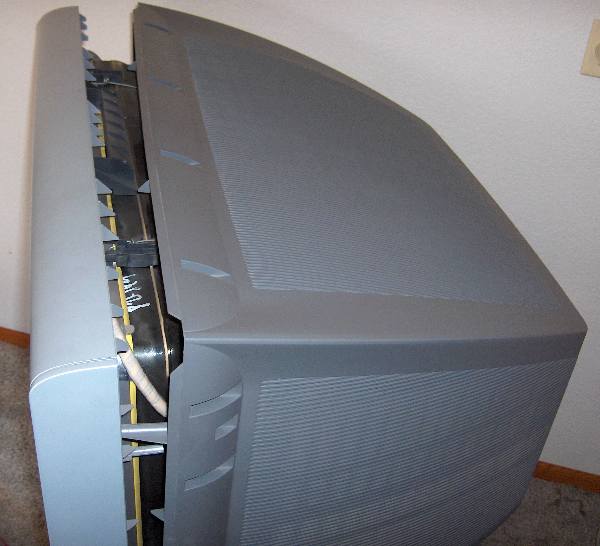
    After removing about a 17 screws, the rear shell can be slipped off.

    The ‘D’ board is the one shown in the picture below. I should mention that before removing the cover, you must unplug the TV and give it a few hours for the high voltages to dissipate so as to avoid shock hazards. It’s best to unplug it and wait overnight, since if the TV is not working so there’s no need for it to remain connected to power.
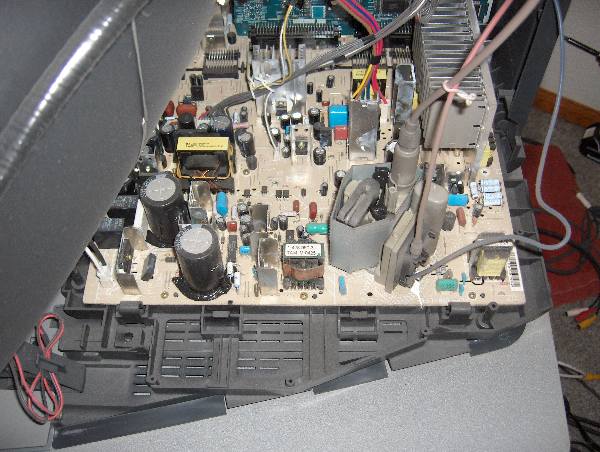
    Sony Wega 'D' board

    The 'D' board shown above is held in with about 8 screws.

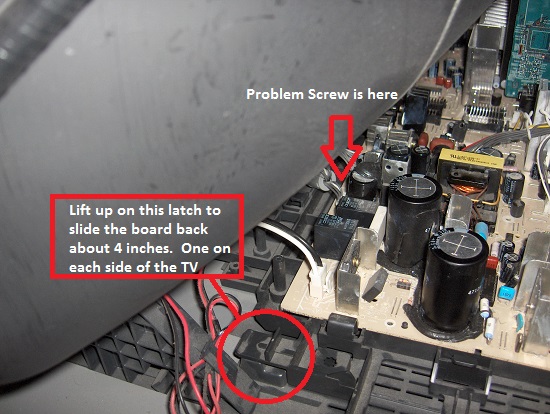
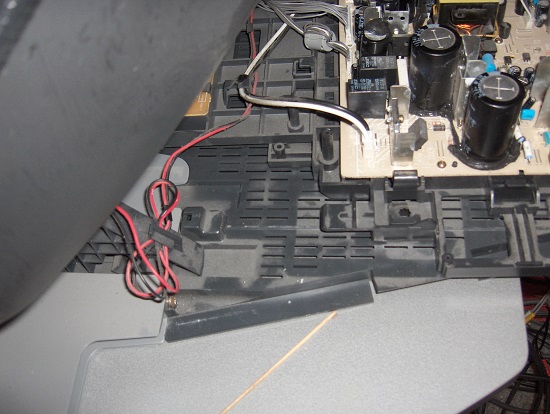
    It wasn’t clear how to remove the board, or if it would be necessary to undo all of the wiring connections. Some of the connectors were easy to remove, but the 3 high voltage wires that connect to the CRT did not have easy-to-unplug connections. I eventually figured out that I didn’t need to remove those wires at all. There are a number of connectors that need to be flipped upward to disconnect the ‘D’ board from an adjacent board. It wasn’t clear at first how they worked, but if you pull them upward, they unsnap and pivot up 90 degrees. I unplugged all the other cables I could find, removed about 8 screws, and the board came out far enough to let me rotate it into a position where I could access the bottom of the board. It was necessary to use a stubby screw driver to remove one screw that was far forward, hidden between two connectors, and just under the CRT. The board was still tethered by the high voltage connections, but I was able to fix it ‘in place’, by turning it over like shown in the image below.
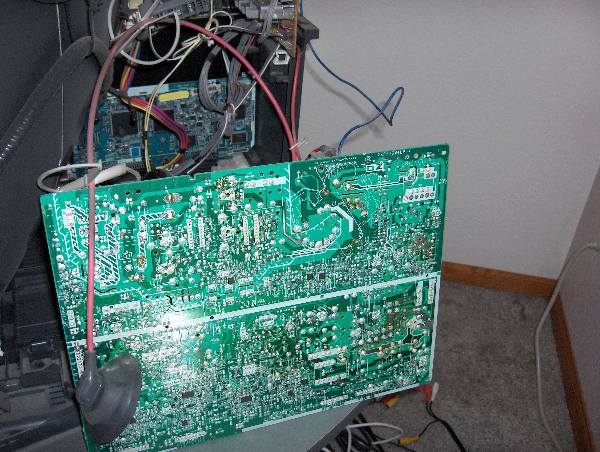
    Sony 'D' board shown flipped in repair position

    Bottom of Sony 'D' board shown rotated in repair position. Note, it's not necessary to disconnect the wire with the suction-cup-like insulator on it.

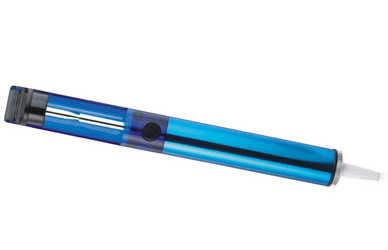
    Unsoldering the two ICs is not difficult, if you use a spring loaded solder sucker like the one shown below.

    Spring-loaded Solder Sucker

    A spring loaded solder sucker like this one works well to remove the solder.

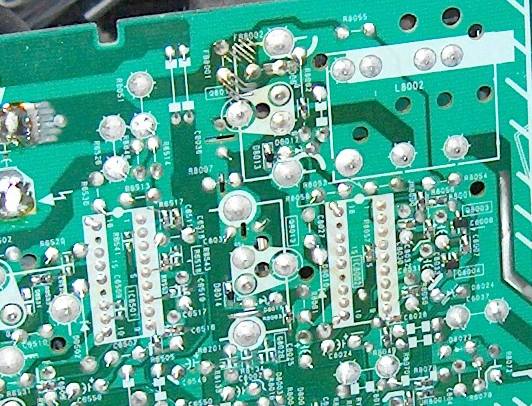
    Close up of IC6501 and IC8002 from bottom of board. Note each IC has two unsoldered pins.
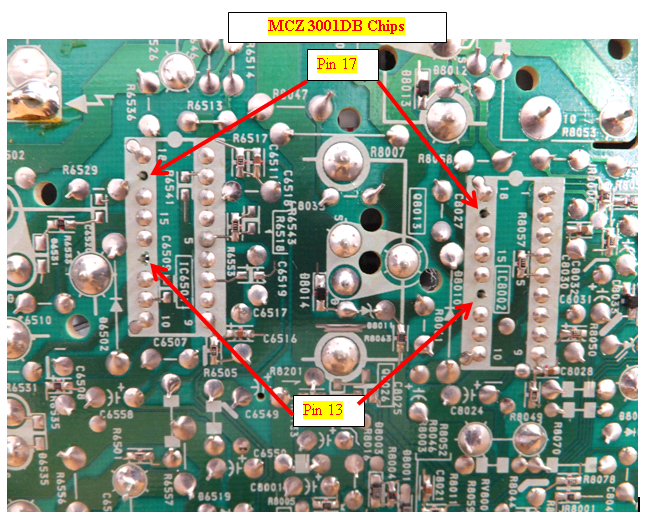
    Do NOT solder pins 13 or 17. If you're using a socket, it would be best to clip the legs in those holes off the socket.

    Be aware that each chip has two pins are not soldered to the board. This is normal and so don’t try to solder those pins or the fix will not work. Take note of the orientation of the chips since there is a notch on one end facing the closest edge of the board. You do NOT want to install the chips backwards. Also, don’t solder the new chips in directly. Use sockets in case you ever need to do this repair again, since having to unsolder these chips is most the work. If they were socketed in the first place, you replace them without having to remove the board at all.

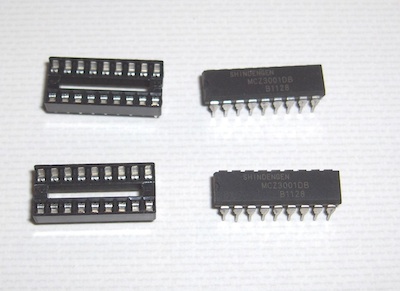
    I wasn’t sure of the best way to purchase the ICs, since many forum participants mentioned purchasing them on Ebay, where there are literally dozens of vendors offering MCZ3001DB chips. The vendor I chose was TriState Module out of Evansville, Indiana because of their reasonable price for the ICs ($6.99 each) and fast shipping ($5 for first class mail). The parts made it to Colorado in just 2 days. I also needed a pair of 18-pin dip sockets which I found at the local Radio Shack for $.59 each. They look like this:

    18 pin dip socket

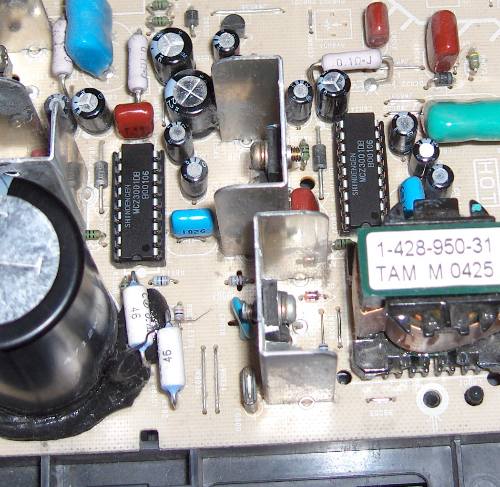
    After replacing the ICs with sockets, you’ll need to install the replacement ICs. Odds are that only one of the chips is bad, but since you won’t know which one, it’s best to just replace them both. It is necessary to squeeze the pins together to get the legs aligned with the holes in the sockets. This style of IC has its legs spread out by default, and so they won’t automatically align unless you pre-bend them inward just a little to align with the holes in the socket. Carefully examine the chips after you install them to make sure all the legs made it into the socket.

    MCZ3001DB chips in sockets

    IC8002 and IC6501 installed in their new sockets.

    After re-installing the board and attaching all the cables, it would be a good idea to test it to make sure the repair worked before reinstalling the cover. With luck, your TV will be back up and running, avoiding a premature trip to the recycler. I can’t guarantee this fix will work for you, but the consensus on the forums is that it frequently fixes the 6 or 7 blink code problems on the Sony Wega models.

    I found the repair to be of intermediate difficulty, certainly not as hard as repairing the transmission in a washing machine, and the result was very gratifying. And if it ever happens again, I could fix it in a few minutes, thanks to the sockets that are installed in there now.

    In the event it doesn’t work for you, then maybe getting one of those new and improved flat panel TVs is your best alternative. :-)

    Share
     

    161 responses to “Fixing a Sony Wega with a 6 or 7 blink code”

    1. I started searching for a solution for the same problem and same TV and just found this post from a day ago! I could have written the same introduction. Thanks so much I will be tryng the repair in the next week or so and let you know. Fabulous post and clear instructions – many thanks for taking the time to do this. If i need to repair my washing machine transmission I will check out your other link!

    2. Hi Dave, I hope it works as well for you as it did for me. I don’t usually get comments this quickly on one of my repair postings, so perhaps there are a lot of Sony Wega TVs with this issue.

    3. Great article and pictures. I have a KV34HS510 that had the 6 blinking lights. I did some additional research regarding desoldering chips and followed your advice and to my surprise I have my Sony back online. Thanks again….

    4. Lee,

      I want to thank you for the information you posted on how to fix this problem.

      I had the same problem that you describe in your article on my TV earlier this week. The technician that came to the house indicated that the problem was something else but I did not buy it. In searching the web I came across your article and agreed I had the same problem you were describing. I ordered the parts on Tuesday and received them yesterday (Friday). Your instructions were right on and I was able to accomplish the task in little less than three hours.

      Thanks to you my family can happily watch TV today and have quite a few $$$ to spare. Pictures in your article were crucial and great to have. Thank You, Thank You, Thank You!

    5. Excellent article, easy to follow. You point out the 2 connections on each IC that are NOT soldered to the board. What did you do with the IC sockets when you soldered them into the board? Did you solder the originally NOT soldered pins? Or did yoy leave them unsoldered? Did you perhaps cut those 2 pins off the IC sockets? So far I have not read any one else’s postings that specifically say to either solder all the pins on the new chips, or make sure the pins in question remain NOT connected to the circuit board. Thanks for your help.

      Al

    6. Yes, you should leave those pins unsoldered.

    7. Just finished following your instructions and fixing my Sony Wega. THANK YOU!!! I can’t believe it’s working again. I was so sure it was going to be replace-instead-of-repair time. But noooo! Ha. Thanks again. Your piece here it what made it all possible. I’ve never done any board level repairs like that in my life before.

    8. One suggestion, to make it a bit easier. After struggling to get that one board screw out that’s under the CRT, I chose to leave it off rather than struggling to put it back in. It’s in a very tight spot and most folks will be challenged to find a stubby _enough_ stubby.

    9. That’s a good suggestion. That screw is in a tight spot and I also thought about leaving it out.

    10. Would those IC numbers also be for a 32″ sony wega

    11. I would bet that they are the same for all wega KVxx models, but if you want to make sure, just take the back off the TV and take a look at the D board before purchasing them. The numbers are visible on top of the chips (and you’ll need the back off to do the repair anyway).

    12. Clear instructions, now i have my tv set back again, MCZ3001DB x2…Many thanks man, very clear pictures, was thinking throw to the trash container in first place, but now my kids and myself will enjoy this great set more time….
      THANK YOU!!!

    13. so when you use the sockets does that mean there is no soldering required?

    14. Hi Josh, If you use the sockets, you’ll have to unsolder the original chips and solder in the sockets, but if in the future you ever need to make the repair again, it will go much faster because then you won’t have to remove the D board to gain access to the bottom of the board and you won’t have to unsolder and re-solder the chip, just remove the old one from the socket and plug new one in. You can also do it one at a time so you can figure out which one failed not just replace them both. Because of the amount of labor associated with removing and installing the D board, it’s more economical from a time standpoint to replace them both when you have to do the soldering.

    15. ok. just got a tv for free. its a crt sony trinitron but a bit different from mine. mine is a sony wega..still a trinitron or whatever. but the one i just got is black. i got it for parts only thing wrong with it was the screen was fuzzy. anywho…i opened the back because i wanted to see if the “ic” chips were the same…they appear to be the same but im not sure because they have a different “ic” code on the d board. you said my sony was ic8002 and ic6501. the ic chips on my parts tv say ic1261 and ic3502. they appear to be the same thing though…do you think they will work?

    16. I have no experience with using these chips to fix a fuzzy picture and so I’m not sure it will help. I used the chips to fix the problem with the screen being completely blank, and the front panel LED blinking 6 or 7 times. If you do decide to give it a try, let us know if it works. Just make sure the chips have the same numbers printed on them as the ones you’re using to replace them.

    17. I have the exact problem with my sonywega KD-34XS955. Your fix matches my tv to the tee. I just got the parts and ready to install. Are the IC’s the same? Because they look the same, but ordered them using IC6501 and IC8002.

    18. Yes, they are the same type of IC. The numbers 6501 and 8002 are what are known as reference designators, to differentiate them on the PC board.

    19. My young neighbor just replaced the two IC’s
      Less then $20.00 for the IC’s and plugs on eBay.
      Gift card for my neighbor.
      Cheap fix.
      Thanks for the information
      PS This was on our Sony Wega Trinitron 40 Inch

    20. Plugs=Sockets
      Again Thank You for the information

    21. Thanks a ton. This worked wonders for my 32″ WEGA! No more blinking 7 lights or when it would intermittently work blinking 5 lights.

      Thank you again.

    22. My Sony WEGA has the same symptoms. My local tv repair man, from whom I bought this tv, told me that the likely problem was the picture tube, and that he MAY be able to fix the problem with a $211.00 kit that they must install at their shop, but was not going to guarantee how long it would last. He charged me a $55 service call to come to my house and tell me this, but says he couldn’t fix it at my house and recommended I either let him take it in (for an additional $100 service) or just buy a new tv from him and let him recycle this one. He obviously didn’t remember this was the same line he used on my 7 years earlier with another tv that was supposed to last me a life time which it too only lasted 7 years, and I let him take it in, only to find that he fixed it and put it in his “used items” show room. I told him I fell for this the first time, but I’m not buying another tv from him. Thank you for this post. You may have saved me at least $400.00 in repairs and further service calls, AND, I’ve ordered a new LED tv from someone else.

    23. This is #23. Successful repair! Can’t thank you enough for the pics – they really helped identify the ‘D’ board & the chips. I found it necessary to disconnect only the three cables at the rear of the board. The board can be rotated to stand up easily leaning against the ‘A’ board. There’s a plastic post on the base of the chassis which you can set the bottom of the board behind – perfect. I bought a 25 watt soldering iron & an anti-static solder sucker for board work. For newbies just make sure the pin is movable after you suck out the solder. They can’t be stuck or the chip won’t come out (they came out easily with a long thin pair of needle nose pliers). To prevent damage, you want to get the solder job done with a minimum amount of heat. I found it worked better to apply a small amount of solder to the tip of your iron to melt the solder around the pins quickly. I marked the unsoldered pin locations on the board with a red sharpie pen (also the board mounting screw holes to make it easier to locate them). There are nine screws. The one near the back edge is almost impossible to see. A magnetized phillips bit, such is common with power drill/drivers worked better than a stubby for me. I put a small socket on it for better grip. This screw and the cable next to it were the biggest hassle for me in this repair – I would recommend securing these first – that way if you have to remove the board for any reason due to problems with these two it’s a lot easier (I dropped the screw and it got wedged under other components and then I bent the pins on the small 5 or 6 pin connector and had to remove the board to straighten them). This tedious process requires an inspection mirror, flashlight and smaller hands. The four ‘drawbridge’ connectors were new to me, it took me a while to learn how to pop them up. This same interior edge of the board has some rigid plastic hold downs and I found tilting the board up at a 45 degree angle helped the edge slide into them easily. The cabinet cover also was a hassle getting it to seat properly so all the srews could be installed. I started at the top. Be sure the cover’s bottom lip slides into the groove around the base of the chassis. This seemed to help a little bit, but it was still a fight. The successful repair made the effort worthwhile! Even with the new tools, I estimate the cost was about $70. BTW, use a tip cleaning sponge and clean your tip frequently to prevent excess solder from getting on other components or causing problems.

    24. Hi Wayne, This is a very inspirational comment. I can’t believe you learned to unsolder/solder to make this repair. Your advice is spot on. I’ve been soldering for 40 years, and so I forget the tips you learn along the way, but your comment covers many of them, like minimizing the heat, adding solder to the iron, cleaning sponge, and making sure you can wiggle the pin with needle nose pliers after the solder is removed. If there is just a tiny bit of solder left, you need to break it by wiggling each pin and then the chip will come out. Those are very useful de-soldering tips. Hope you get to use your new-found skills again. Maybe you should take up electronics as a hobby :-) .

    25. Thanks for this Sony 7 blink repair self help. I got the MCZ3001DB chips and sockets for $17 on ebay. The hardest part was disconnecting the circuit board connectors. I was surprised how easy it was to remove and replace the ICs with a solder remover and a 45W pencil solder iron. My TV is working again with only a couple of hours work. The TV I fixed is a Sony KD-34XS955. Great writeup!

    26. this is an outstanding article, i will call it my savior at this point because i now suffer the same issues with my 7 year old television and this is by far the best description of repair on the internet. i have never soldered before, so i’m doing as much research as i can before i attempt. any recommendations on things to look for in a soldering iron. i figure at this point i don’t have anything to lose and i am pretty handy with most things. thanks in advance for any advice

    27. No dice. Had a 6 blink code on my KV-32hs510. Followed instructions and replaced chips as instructed. Now it just tries to come on, blinks three times and turns itself back off.

    28. I am bummed!! This REALLY works! My hopes for a new flat screen tv HDTV were dashed as my Husband fixed our Sony Wega that had 7 flashing lights after using this website! Total cost?…$17!! Thank you :)

    29. just got the light bulb line from a repair shop today?

    30. i was wanting to remove the d board and have someone experienced solder in the ic chips, couldnt i just cut the the power wires 2 red and one white and solder them back and use heat shrink when reassembling. i wanted to make sure there isnt a shield used inside the wires insulation or something that might be damaged. are those 3 wires just wires that can be cut?

      also i was looking at the blink codes and for 6 blinks it mentions to check c515,c516 and the jungle IC, IC206 any thoughts.

      i have to order the parts and noticed some people needed capacitors for a similar problem. so as cheap as the parts are, if its common i would like to replace them all at the same time. thanks for the great info and pictures.

    31. Lee,
      Wanted to let you know that replacing the two chips has fixed my 6-7 blinking light issue as well. You are probably the only person on the web who put up a nice guide on how to replace these chips… with pictures!!
      You’re a life savor. You probably saved us $1000 in buying a new TV.
      It’s funny, if this problem happened in a car, there would have been a recall. I’m going to think twice about buying another Sony product.
      Thanks again, Lee.

      P.S. I have a 40″ kv-40xbr800. Although I had more screws to take off, your solution was spot on.

    32. Add another success log to the fire. Thank you for the great walk-through. This problem is apparently so common that you can order a pair of these chips on Amazon.com.

    33. Lee, I have to add my voice to all the others thanking you for this fix. My 7 year old KV-34HS420 came up with the flashing light failure last week.

      This had happened before, after the set was only a month old. Sony provided a entire new board but I had to pay a local shop to install it.

      So, obviously, it’s a known issue with Sony, but I had no hope they would fix it again after 7 years.

      Long story short: I ordered the circuits and sockets on eBay (B&D Enterprises – $16.25, free shipping). Ordered a soldering kit meant for teaching kids to solder electronics and a solder sucker on Amazon. Total for everything:$40.13.

      Yesterday I spent learning to solder — never did it before. Today I followed this thread (have to tip a hat to Wayne for his additional comments about accessing that one stubborn screw, which connectors need to be pulled, and those very fine soldering tips). Just finished up and powered on.

      It works!

      You saved me a lot of money, but more than that we saved what is really a good TV with a great picture from leaving here and going who knows where.

      Thank you sir(s). I owe you.

    34. Hi, I was encouraged to try and fix my Sony tv myself by reading your helpful information. I made the bad mistake of not leaving the two pins on the connector unsoldered!! I realized this when I plugged it in to see if I fixed it and saw it blinking 10 times. I guess I have to de-solder the connector and do it all over again. When I originally did it, I found it very difficult to get rid of the first solder. I was using a regular cheap solder tool from Radio Shack and some copper wire. Would it be much easier with a tool specifically for de-soldering? Also, how do I know which two pins on the new connector to leave unsoldered now that I messed it up? Is there a visual anywhere I can use? My Sony model # is KP51WS520. Thanks!

    35. Lee, it worked for me as well. Any idea how long it will work. Has anyone experienced a repeat failure? Please advise. Thanks.

    36. The spring loaded solder sucker is a requirement, in my opinion, other techniques for doing it don’t work as well. Solder braid just doesn’t get the solder out of the holes and the rubber bulb-style solder suckers don’t work at all in my experience. The pins that are unsoldered are pins 17 and 13. I don’t know if that’s what’s causing the issue you have, but I’d remove the solder from those pins and see if it fixes it. The image on my website shows the pins that are not soldered.

    37. I see that you put in new sockets?? Doesnt the T.V already come with sockets? How do you install the new ones and why can’t you just use the stock one??

    38. Nvm I understand now! I will be doing this myself in the next 2 weeks! Thanks so much for the info your seriously my hero of the day.. cheers!

    39. The original chips are soldered to the board. I installed the sockets in case they ever go bad again.

    40. Lee Thanks so very much for posting this blog. What a resourse to provide given the very expensive alternative.
      I have little experience with soldering but have found some resourses online that I believe I can follow.
      I am trying to decipher if you/others have soldered the sockets to the board while upright. Won’t the solder run without the D board lying “flat”? Will the desolder not be more successful in the horizontal position also ? Wayne seems to suggest that only 3 cables at the rear needed to be disconnected…a the rear of the set I assume.

    41. At the rear of the D board (I should have said), as referenced to the rear of the TV, I assume?

    42. If you can get the board out by disconnecting all of the cables, then it might be easier to do the unsoldering/soldering by laying the board horizontal. I thought about it for a while, and then I figured I could do the soldering with the board standing somewhat upright, and so I did it that way.

    43. Lee,

      Thank you so much for posting this great tutorial!

      You’ve helped save another Sony Wega ( KV34HS510 ) from the landfill.

      I wound up spending about $50.00 on the repair, and learned how to solder in the process. A friend of mine gave me an old ethernet card to practice on (which is a good idea if your skills are suspect), and of course, i found several tutorials on the web showing how to solder/de-solder. The hardest part by far was the de-soldering. I found the most important part of the de-soldering process was to first *solder* the connections so that the old solder was mixed with the new solder. It was then pretty easy to suck out the molten mix and leave a clean hole. There were a few holes which i had to re-solder about 4 times before i got them cleaned out properly; patience is a virtue! (a magnifying glass is very helpful for making sure the holes are cleaned out properly).

      At any rate, I’m very gratefull for the excellent tutorial.

    44. hello, lee

      we have had are tv for a couple of years. we purchased it used. yet weith a family of 6 r not in the possision to purchase a new tv. first i would like to say thank u for the the blog on ur web site. are tv went out about two weeks ago. in searching the web i came across this wery helpful info you laid out step by step. i ordered the parts from tsm and as u said two days. as well as the parts at radio schack for 59 cents a piece so for less than $21.00 we now have a working tv.with the help of our great neighbor with a solder sucker and experience in soldering.so thanks be to God our neighbor and the info u provided do to ur tv problems. greatly appriceate it.r tv had the same prob. u discribe of urs. thanks, to God be the glory great things he hath done!

    45. Just got back from IRAQ and the darn TV KV-36HS420 is showing the 6 flashing light thingy. I’m going to buy the chips and make this a project. NOV 16 2011. Wish me luck!

    46. i had posted above about removing the board by cutting the wires and found other info that stated others had cut the smaller red and white wires and removing the large red wire from the glass as show in the pictures above (caution high voltage) you will need to be real careful on how you repair the smaller red wire because it also is high voltage.

      i had the 2 ic chips replaced along with the two large capacitors in the same area. they are recommended on the site lee recommended for ordering the chips. the tv has been working for a week now with no problems.

      thanks lee.

    47. I posted about a week ago about trying to replace the IC piece along with the socket, but then I made the mistake of soldering the # 13 and 17 pins. I desoldered those two pins, still didn’t work, so I replaced the socket with a new one to start over. I’m assuming I wasn’t careful enough with my soldering and messed something else up, because now it is blinking 10 times. I’m wondering if I should just try to find a new/rebuilt D board. Any suggestions? Thanks.

    48. Hi Jo, There’s no guarantee that this fix works for everyone who experiences the 6 or 7 blink code so it is hard to say if the soldering induced the problem that now makes it blink 10 times, or if it was a different problem to begin with. If you search around the web for explanations of the blink codes, they are not very helpful in pinpointing where the problem resides. In fact, the 6 or 7 blink code is never mentioned in conjunction with this description of blink codes, which I assume came from a Sony manual. However, it does mention that a 10 blink code is likely related to the ‘D’ board.

    49. Modus link (formerly PTS) says they will repair the D board for about $110 plus shipping. I guess that’s probably the best way to go if I want to keep working on this TV. There’s also a possibility that I did some damage to the board, and then they can’t fix it. I am seriously considering just buying a new TV for a couple of hundred more. It was worth a try, plus I learned some things about circuit boards and soldering. Thanks for your help.

    50. Thanks for the information provided here on your website. Replacing the 2 MCZ3001D with chips purchased on Amazon.com fixed my Sony kv40xbr800 from its 6-blink problem. The pictures provided were a valuable resource. Saved me major $$$$ just in time for the holidays! Thanks for your post.

    51. This fixed my 6 year old Sony. We like the TV so much the kids are getting the flat screen I purchased while debating to fix or recycle. I had removed the back and then found your website. Your descriptions and pictures were right on. Cost $20 for ICs and sockets.

    52. I’ve been at the screw underneath the tube for a couple hours. Can’t find a stubby enough screwdriver and can’t get a good enough grip on a bit. No bit+socket combination I use will fit. Kind of driving me crazy here. Tried to make a handle on a bit using Gorilla Tape but even that isn’t working. That screw is in there something fierce. Might have to call the whole thing off due to that one screw.

    53. Welp, I stuck with it and finally managed to get that demon screw out. Ended up sticking a bit in the screw and then grabbing that with pliers. That let me unscrew the screw SLOWLY as there was hardly enough room in there to turn the pliers.

      The black bridges that connect the D board to the adjacent board gave me a lot of trouble as well. I could snap up the middle two by hand but the outer two were a pain. Used a small wrench and stuck the lip of the wrench under the lip of the bridges and then just pushed the wrench down, giving me some leverage action that popped up the bridges.

      Compared to getting the D board out, soldering was a breeze, and that was only my second time ever soldering. (I practiced a few days ago on some IC chips in an old boom box.)

      In all honesty, for somebody who has ZERO experience with this kind of stuff, this project was REALLY DAMN HARD. The area in and around the D board is small and cramped and full of connectors and capacitors and cables and that makes it extremely difficult to maneuver around in there, especially for somebody with large hands like myself. Hell, just getting the new ICs into the sockets I soldered in was difficult.

      That being said, it did work. My TV powered on just like it used to. A TV repairman I spoke to wanted $120 just to look at the TV, and people who have had this repaired professionaly have reported spending between $200 and $300. Soldering equipment (iron, solder wire, small bit, sucker) cost me around $60 and the new ICs and sockets came to a total of less than $20.

      My hands hurt, I have a large blister on my thumb, and it took me nearly 6 hours. But at least I saved some money I guess.

    54. Congratulations on sticking with it and fixing your TV yourself. I sometimes have concerns about taking on a repair project out of fear that I’ll be sorry for the amount of time and effort it took to complete it, or that I won’t be successful at it. But the more challenges I overcome in a repair job, the more I end up appreciating the results in the end. The screw under the tube, situated between two connectors, is quite a challenge, and it almost caused me to give up too. I don’t recall what tool eventually freed it, but I remember the relief when it finally started turning. I had to think twice about re-installing it :-) .

    55. Thank you very much for this tutorial, just finished installing the same kit as you… Seems to be working fine so far!!!

      I paid over @2200 for this TV back in 2004, I glad to still use it till this day. As a matter of fact I bought another identical one off of craigslist for @125 :) while I was waiting for the IC modules to arrive.

    56. hello larry really good job and it seems to be quite humanitarion as many people as youve helped!if i understand correctly this fix is quite contrary to the recommended fix when my 2003 sony kv-34drc510 televisions standby light blinks 6 then 7 times!!! it says h stop no raster blah blah blah and to check c515 and 516 and ic 206 that bieng said this fix doesnt seemto address either of those components. why does it work and is the self diognosis erroneous_ and do you think the same procedure will fix my tv_ thank you very much for your help Brian

    57. I also read through the Sony documentation for interpreting blink codes and found it of no use in fixing this problem. The only reason I could think of is that the diagnostics codes and fixes were written back when this TV was new, and no one at Sony ever imagined these chips would fail in the field. The chips must have either a manufacturing defect that causes them to fail prematurely, or it’s possible they are overstressed in this application which could also cause early failure. There is absolutely no documentation on these chips on line that I could find so we may never know the true root cause.

    58. thanks lee and by reading youre post and the comments that are givin this seems to fix about 95% of the sony tv that exhibit the 6 then 7 flash symptom. what do you think should i give it a try_ oh and by the way i live in cancun mexico my sony was made in tijuana are their parts available here! thanks again lee you should get some kind of award for youre excellent tutoriol! Brian

    59. Hi,

      I got board out but can I disconnect those 3 wires to completely remove it (from big area towards outside of board)? I have not figured out how to get those 3 wires (2 red and 1 white)out so can remove board complete. Is that possible? Let me know. Help has been great so far!!! Thanks LEE!!!

    60. I had a difficult time trying to figure out how to disconnect those 3 wires, so I left them attached and just fixed the board in place.

    61. I discoonnected “everything”, took the back of the t.v off gently vacuumed everything. then I noticed c515 was bent so I straighten it. Put everything back together was about to call repair place. I Figured I try turning it on, and the thing worked. My husband is mad he wanted a 50″ flat screen like all the nieghbors. He should of married a helpless house wife.

    62. Simple fix. Great instructions! We were able to follow the pictures, get the parts and fix the TV ourselves. My boyfriend is a carpenter, and had never done anything like this before, I had the experience so I let him learn on his own and was handy if he got in trouble. We fixed it for under $20.00, the most time consuming part was using a wick instead of a solderpult to remove the solder. Thank you, you saved us a lot of money in a bad economy. TV works like new again. It is cured!!!

    63. This fix worked brilliantly for my Sony KV-34XBR800 as well! Thanks so much for sharing – you’ve clearly saved a lot of people (including me) a lot of money! My experience ordering from Tristate Module was also very good – super-quick order turnaround and fast shipping. On their website, the list of TVs using the IC you specify (MCZ3001DB) does not include the KV-34XBR800 for some reason, but I can confirm that this is also the correct part for that TV.

    64. I just finished repair and put in 18 dip pin socket. Hopefully I did it right, I have never de-soldered or soldered before and was in tight space, but looked OK and hoping for best. I then ordered Chips from site above, was easy and used paypal, once they get here I am hoping is fixed. I will keep my fingers crossed!!! All put back together just waiting to pop chips on and see if works. Only cost $40 for everything, tools and chips, used cheap solder iron, manual solder sucker, pins, and solder from Radio Shack and that was only $20, then $19 for chips shipped and a couple hours of my time. I did use you tube to check out soldering and de-soldering training. Will let all know if works here in MN!!! THanks

    65. Another electronics first timer, another successful repair. Took about 2 hours plus many more researching and rounding up equipment, messing around with the solder and iron…

      Here’s my tip:

      With the TV back removed, the base housing can slip out of position. When it slips, it’s possible that the plunger on the power button won’t reach the the board-mounted power switch.

      When I smoke-tested my repair the TV wouldn’t come on. I thought I had failed. Then found that I could turn on the TV with the remote. Finally I discovered the board under the picture tube containing the switches was out of position.

      In short, if your TV won’t start after the repair but befor assembly, try the remote and suspect misalignment of the base.

    66. Lee, Thanks for the article. You should write technical documentation. I haven’t done it yet, but will be doing it soon. I have the same model and it is starting to work sometimes and mostly not. I used to work in electronics all the time and this was the article I was looking for. It’s a great tv and similar you, I got mine in 10/04 only because at the time it was the only one then that had 1080 and the flat panels then at 1080 were like 3-6000. And the blacks were terrible. I love this tv. I am a NASA certified solderer so I’ll just use braid as I’m really comfortable with it. You rock! Great technote.

    67. [...] http://k0lee.com/2011/05/fixing-a-sony-wega-with-6-or-7-blink-code/ [...]

    68. [...] For information on the Sony Wega CRT flat CRTs with a similar problem (in this case a model KV34HS420), visit Lee Devlin website and view his posting titled “Fixing a Sony Wega with a 6 or 7 blink code“. [...]

    69. I have a Sony KV32HS510 that has the same problem described here and plan to replace the two ICs.

      There is a note on the Tri-State Module site that suggests replacing a couple of fusible resistors and caps along with the ICs.

      -Replacement of the following parts along with the MCZ3001DB IC’s is recommended
      -.1 Ohm 1/2W Fusible resistor (2 per board). Order 120293361
      -1200uF 250V Electrolytic capacitor (2 per board). Order 1200UF250V

      What’s the consensus on replacing these other components? Worthwhile or a waste of time.

      Thanks,

    70. There have been quite a few responses to this posting and so far no one has posted that those parts were needed. However, there have been a few reports where the MCZ3001DB chips didn’t fix the issue, and so it could be possible that those other parts were the culprits. If they don’t cost too much, then it might be worth ordering them, replacing the MCZ3001DBs first and see if that takes care of it. It’s possible that Tri-State knows that the chips take care of 95% of the issues, and if that doesn’t work then for the other 5%, the resistors or capacitors fix the problem. I don’t know what the real ratio is, but this is my guess.

    71. Hi Lee – I wish I had come across your web site a few days ago – or even a year ago. I bought a used 42″ WEGA about 18 months ago – a few months after I bought it I got the blinking light and auto shut down – intermittent at first, and then it wouldn’t come on at all. A technician diagnosed a burnt out bulb and I drove 2 hrs to Toronto to get a replacement (after market, $120 plus tax). The TV has an exceptional picture and I thought it was well worth the cost to keep it going – plus I hate to landfill equipment (which is also part of why I prefer to buy used). Then, 11 months later, just a few days ago, the blinking light syndrome re-appeared. I blamed it on the non-OEM bulb and went back to Toronto, bulb and case in hand and bought a new OEM bulb ($140 plus taxes). I got one day out of the new bulb and the light started blinking and auto shutting down again. You can imagine my anguish. Now it wont power up for more than a couple minutes. Until I read your article, I was sure the tech had sold me a defective bulb. After reading the above blog, I am pretty sure this is the classic 6 blink tech problem with the chip set and I have needlessly changed the bulb – perhaps even twice. I’ll look for parts next week, try the fix you suggested and let you know. Thanks again for such an excellent article, pics and very complete instruction – a great service. Cheers and have a great new year!

    72. Thank you, Lee, for your detailed posting. You inspired me to repair my KD-34XBR960.

      I had trouble determining how to un-couple the A-board to D-board interconnects, so here is a description for the similarly afflicted. These devices hinge on the A-board side. They snap into détentes at either side of the D-board companion sockets. Use a chopstick or other small rod to lever each side of the connector up on the D-board side.

      Regarding the D-board screw under the monitor: I used a 1/4″ socket with 1/4″ drive socket handle and a 2″ reversible (phillips and straight) screw gun bit. This worked very well.

      In my research about this failure I had the opportunity to consult with a Sony trained repair technician. He insisted that all that needed replacing was IC8002 – the one closest to the flyback transformer (the thing with the fat wires). I took his advice and am grateful as it saved significant time and risk.

      I also used Tri-State Module for parts and got my DIP18 sockets there as well.

      The Sony users community owes you a great debt, Mr. Devlin. Thank you for your fine, well-detailed work and clear communications.

    73. Well, same issue. A beautiful Sony television that would not turn on. After searching the Internet, the consensus was one of these chip might be responsible.

      I followed the instructions and am happy to say the replacements of these chips fixed the problem.

      GREAT INSTRUCTIONS AND THANK YOU…..

    74. Regarding recommendation to replace resistors and capacitors:

      I found that one of my capacitors was swollen at the top which seemed to indicate a bad capacitor (maybe in turn damaged a chip(s)?). Considering the low cost, I bought two and replaced them both.

      Worthwhile or waste of money? Did it help? I dunno, something did and they were alot easier to remove and replace than the chips.

      Capacitors store voltage. Be careful. Observe markings/polarity.

    75. Good article. I had the issue with the “7 flashes.” This occurred once before with this TV about 5 years ago, and I had a repairman in to the tune of about $600, where he replaced my power supply (the ‘D’ board) with another, which apparently had been “reworked.”

      I followed your instructions, bought the two ICs from the source you linked to for less that $20 including shipping.

      Since I am an EE, I happened to have a solder station at home with a vacuum “solder sucker” on its second channel, so it made removing the old solder a breeze, and the chips nearly fell out.

      Not sure how you get the ‘D’ board being attached with 8 screws because there were none in mine. Just a couple plastic clips to unlatch to free up the board. I followed your advice about manuevering the board to repair it without removing any of the high-voltage cables, and that worked well.

      I did notice that on the “reworked” board, the two chips had been previously replaced, and the soldering job was pretty sloppy, with a lot of burned resin left behind. Its a wonder that there were no solder bridges on the original repair.

      I put in the new chips and everything went well. TV started right up with no problems when testing before putting the back cover on. Its been playing fine ever since. Thanks for your article. It made the disassembly and re-assembly go smoothly as if I had had to do it the first time I would never have figured out how to get the back off without damage.

      The hard part was getting the clip out that holds the base of the back to the stand.

    76. Excellent pictures and detailed instructions. I was very nervous about my ability to repair a circuit board. The desoldering took a bit of time (maybe a little over an hour). Probably have 4 hours in start to finish and maybe $40 in parts and materials. Television now works like new and my wife can’t believe I fixed it. The sockets were a great idea to avoid desoldering if this repair is needed in the future. Thanks for sharing your knowledge and experiences with fixing this TV. Saved me from buying a new one!

    77. Roberta Dikeman

      This is new to me, but I’ll try it. Do I need to solder the replacement chips to the D board or just “put them in”?

    78. Roberta Dikeman

      Also – do you buy two different chips or two of the same one?

    79. Hi Roberta, Both chips are the same part number. To install them, you will need to unsolder the chips from the D board first. I would highly recommend soldering in sockets after that, just in case you need to do the repair in the future. If you choose not to install the sockets, then you just solder in the replacement chips.

    80. Roberta Dikeman

      Lee,
      you have been very helpful, but can you tell me what a socket is? Perhaps a picture or a part number? I can go to radio shack, but I not sure I know what to ask for

    81. Hi Roberta, I’ve updated the original post to show a picture of a DIP socket. The RadioShack catalog number (276-1992) can be seen here.

    82. Anyone have a 42″ Trinitron KV-40XBR700 that’s completed this repair? Getting this D board out looks like it’s going to be pretty rough to do.

    83. Mike Bonczkowski

      Thanks A TON! This how-to was exactly what I needed. Super easy after reading this. I was so happy with myself after fixing my tv.

    84. I got it apart… mine’s composed of 2 “D” boards, and one chip on each board. Now to get the new chips and install them. Hopefully I can get everything back together. :)

    85. I’m sorry to say Lee, this did not fix my TV. I have the same model you repaired. I am no scholar at soldering but I am confident that everything was done correctly. All joints look neat and all connectors are connected. Now I get three blinks and the TV powers off. Any suggestions will be appreciated.

    86. Hi Elwood, Sorry to hear that the chips didn’t fix the problem. When I was researching this issue, changing these chips seemed to fix it more often than not, but there were reports that it sometimes did not work. However, I did not find any other fixes that worked when this one failed during my research. In a previous comment, someone reported that TriState’s web site which is linked to the article recommended a few other parts to purchase which were some fusible resistors and electrolytic capacitors (about another $20), but I cannot speak to the efficacy of changing those parts, nor do I know where they are located on the board. Another option is to purchase an entire D-board.

    87. How do the connectors flip up that connect this board to the adjacent one.

    88. They rotate up 90 degrees. You have to give them a good tug to unlatch them but they will rotate about the axis that is parallel with the gap between the boards. The side toward the D board is the part that unlatches. The connector is soldered to the other board.

    89. Well my 8 year old 36″ Sony Trinitron started acting up a couple of weeks ago. It would not turn on the first time but would on the second try. Finally it would not turn on at all and the standby LED was blinking six times. A call to Sony had me unplugging it and plugging it back in with no change. They referred me two TV repair services. A little internet search led me to this sight and i thought I’d give it try. A little over $20. later for the ICs and sockets and my TV is working again. Too bad my wife and bought that 55″ flat screen this last weekend, just in time for the Super Bowl. My Sony might go on Craigslist this weekend since we don’t any place in the house for it. Thanks Lee for the excellent explanation on how to fix this problem.
      I read your motorcycle site and and your motorcycle history almost parallels mine. I started out on dirt bikes in high school in the early 70′s and now i am into almost 20 years and on my 3rd BMW, a K1200GT. They are great bikes. If your are ever in the Seattle area, look me up.
      Ron

    90. Thanks. I did get the connectors apart as you reccommended. However, as you said there was no guarentee this is the problem. Replaced both ICs and unforunately it still shuts off and blinks. So… off to best buy or Sams Club we go. Great instruction though and I gave it a valiant effort. Good luck to everyone else.

    91. Thanks for the info. I made the fix and it worked for about 30 min., then shut itself off again and started blinking 7 times again.
      Anyone have this problem also?

    92. I have the exact Sony TV model and error code. I purchased the TV around 2005. About 2.5 years ago our TV started having this problem and I decided I was going to try and fix this myself. Meanwhile we purchased an LCD TV. I was able to get the schematics and some information off the internet about where the problem might be. When I read about the high voltages in the TV it scared me and I decided not to try this project. After 2.5 years of this TV in the garage I decided I would look into it again. I then I found your web site and I went for it. I completed the job this last weekend and you now have another success story. Thank you so much for this article. Total expenses was $40, including the soldering iron and solder sucker. In regards to the “drawbridge” connectors, there are four connectors. The two towards the back looked like it would be difficult to get to. I then noticed there was a slot in the plastic housing that allowed me to use a long screw driver to access the connectors. The screwdriver went underneath the connectors and I just pushed up and the connectors popped off. It was very easy. It appears that the slot was made for this purpose. The one screw located near the picture tube was the hardest for me to remove. From a prior posting I used a small screw bit and pliers to rotate the bit to remove the screw. I only had to disconnect three small cables in order for me to get the PCB board out. Also, I took several photos’ with my 14M pixel camera of the entire set-up that allowed me to study the project prior to starting. This allowed me to zoom in on portions of the board. I hope my experience added to this project. Thanks again from Austin, TX.

    93. Thank you for all the good instructions. I think I may have to make this repair soon. I have a KV34HS510. It still works but when I turn it on, I get the black screen with the 6 blink code. If I use the remote, it takes 2 or 3 tries but it does come on and works flawlessly after that. I have 2 questions: are the chips the same in the 510 as in the 420? If I can, I would like to buy the chips now in anticipation that the TV won’t come on soon. I don’t want to take it all apart yet if I don’t have to. The other question is, has anyone had this happen gradually like mine? Thanks!

    94. Great Post! I actually have two of these TVs both went out within weeks of each other. Both purchased in 2005. I’m waiting on the ICs to come in the mail and in the meantime I installed the sockets. Question: are the sockets directional? Do the notches on the sockets have to line up with the notches on the chips?

      I found the ICs at the following site for $5.99, http://www.suburban-electronics.com/display/MCZ3001DB/MCZ3001DB?gclid=CLHxs8TXha4CFRJR7Aody3eW6A

    95. The sockets are not directional. Good luck.

    96. DIP sockets are not directional, but if they have a notch in them, it’s a good idea to line it up with the notch on the silkscreen on the board so that anyone trying to replace the chip in the future will know which end is which. The socket has the potential to cover the silkscreen and so you might not be able to see it once the socket is in place so if you see a notch, line it up.

      I also got a tip that the pins on the sockets that are not soldered to the board should be broken off. Apparently, these pins that are not supposed to be soldered should not be allowed to short to the board and breaking off those pins would assure that won’t happen.

    97. awesome DIY!!!

      I am going to try the fix on my Sony kv-32hs500

      I have 2 questions.

      1st, what type of soldering tool do you recommend?

      what type of solder do I use?

    98. A 30-watt pencil-type soldering iron would work fine. For solder, a lead tin mix, NOT the acid core solder used in plumbing. Radio Shack sells a kit with the soldering iron, a few tools, and some solder for $10. They also sell a spring-loaded soldering tool for $15.

    99. I tried this fix on the Sony kd-34xbr960, but it didn’t work. Not sure why, given the positive results of others. It no longer blinks 6 or 7 times, but rather 3 times and then nothing. For anyone interested, the plastic chassis that the d-board is attached to slides out and makes it easier to access the difficult screw. There are 2 gray colored plastic tabs on the right and left side which lift up to allow this to happen. I was also able to detach all wires from the CRT. I found the service manual for this Sony model at http://www.schematicsforfree.com/archive/file/Sony/Video/Sony%20Kd34Xbr960.pdf.

    100. Add me to the it’s fixed list!I bought my kv-32hs510 for $70.00 to replace my stolen Toshiba 40″ LCD.After about a month it quit working and I found this website.I bought the IC’s and sockets,dusted off the soldering iron and am watching TV again.Great instructions!

    101. Fixed! Thanks again. My KV34HS510 finally died. It was taking 3 or 4 tries to get it turned for about two weeks. The other day I ordered the two ic chips and sockets on amazon for $17. The next day the TV wouldn’t turn on. I did a lot of research about the shock hazard so I left it unplugged overnight then I discharged the CRT with a screwdriver and ground wire. It didn’t make the pop sound like I read so I figure it discharged on its own. I was lucky enough to have a friend with a soldering iron/solder sucker. It only took me about five minutes to remove the solder from both chips and they literally fell out with slight pressure on the pins. I highly suggest this tool. The new sockets and chips went in with ease and my TV works perfectly.

    102. ok…followed the instructions and replaced both integrated circuits, but, wah wah, nothing…the TV only made a noise like it wanted to go on, but DID not turn on…sooo, I followed the wife’s advice, and checked ALL the connections, and also re-read all the posts..I read where the 2 pins on the IC’s DO NOT get soldered onto the board…
      I re-checked the soldering, and noticed a bit of solder on one of the socket pins…I initially mistakenly tried to solder the pins on the first socket and realized this was a NO NO..
      So, i reheated the pin which had some solder on it, and used the solder vacuum tool (got mine at radio shack, it was $15 but is worth it, it works well and is made of alumimum. seems to be high quality) to vacuum out any residual solder…IF I had to do it all over again I would have just clipped the pins…
      2ndly, I re checked ALL the connections..one of the connections at the rear of the D board closest to the tube is a white in color horizontal connector about an inch long..I removed it and tried to re-seat it..I had a hard time re-seating it, but my wife managed after about 5 minutes..lastly, there is a tray that slides out the circuit boards..make certain that it is pushed all the way in…
      I tried it again, and VOILA! it works now!! thanks Lee!!
      on a side note, has anyone tried the fix, only to not work, and then installed these and THEN the TV worked??

      -.1 Ohm 1/2W Fusible resistor (2 per board). Order 120293361

      -1200uF 250V Electrolytic capacitor (2 per board). Order 1200UF250V

      they were recommended on the tri state module site

    103. Hi,
      I did the repair and when I put it pack to gether it didn’t work either. I took it all all apart to look at the solder joints again, and then put it all back to gether and it works fine. Lesson make sure all the connectors are seated securely, make sure you didn’t bend any pins. And on the connectors that rotate up, make sure all four are clicked down into place.

      Hope that helps.

    104. Why when replacing the ICs do you have to replace the base? why not just replace the plug in IC and not bother with the Soldering in a new Base, thus not having to do soldering

      J

    105. By ‘the base’ I assume you mean the socket? It’s because the chips normally don’t have sockets, they are soldered directly to the board. Adding a socket would make the replacement of the chips much easier if it needed to be done again. If you see sockets in yours, then maybe you have a board that has already been repaired.

    106. I am getting a lot of questions about these extra parts. I assume that sometimes the ICs fail due to a failed capacitor which may also lead to a failed fusible resistor. So evidently, TriState is doing a belt-and-spenders approach and selling all of the parts at once to take care of the situation where one or more components is faulty. Most people only need to replace the ICs to get the TV working again, but if that doesn’t work, then you may also need the capacitors and resistors. They cost about $20 more than just buying the ICs.

      The unsoldered pins must definitely be left unsoldered. In one email exchange, someone told me that the Sony tech recommended cutting those pins off of the socket at pins 13 and 17 so as not to short them to the PC board.

    107. ICs from Surburbon Electronics 5.99. They came in printed with part numder and manufacturer upside down, opposite from the notch. Could they be bootleg?

    108. Add another success story to the list! Thank you so much so taking the time to post your TV repair experience on the ‘Net. You saved yet another Sony Wega TV (Model KV34HS420) from the landfill. I was not thinking that I could handle this repair until I started reading posts of everyone’s success. I have to admit it was a difficult but rewarding repair process. Here are a couple of things that I did that may work for other brave souls: I used one of those small 4″ long mini LED flashlights and placed it in the empty space in front of the D-board underneath the CRT. It provided great light as I removed the dreaded forward screw. It also helped to locate the other screws and connectors. To remove the forward screw I used one of those short offset phillps-head screwdrivers. I could only turn it about quarter-turn each time but eventually it came out. Needless to say it didn’t get put back. Not being a soldering expert, I strugged in this step. As I continued I got the hang of it. Thanks again!

    109. Thank you Lee! I had a 7-blink code issue. Count me in as a very appreciative consumer of your information.

      I had never worked on a circuit board before so I viewed a few videos on Youtube. I was schooled on de-soldering with a solder remover and soldering components on a board.

      I did use the Radio Shack kit for 10 dollars. That kit had a soldering iron, solder and some other cleaning tools for removing extra solder.

      I used chips from B&D that came with the sockets and I ordered a solder remover for a few dollars on Ebay. Free shipping on both.

    110. Thank you for putting up this info. I helped my Dad with the repair and the tv works as new! $10 for the parts and 2hrs labor – not a bad way to spend an afternoon.

    111. Thanks for posting this. I just fixed my KD-34XBR960 using your post. It only cost me $20 in parts and supplies, saving me over $500 to replace this TV. Much appreciated.

    112. There are two clips at the front of the of the base that the D boards are mounted on if you release them it lets the whole thing slide back solving the stubby screwdriver problem.

    113. mike from evansville

      Another success Lee.Saved the best tv i ever owned,kv34hs510.Altough i did get to buy a pretty good plasma just in case it didnt work. thank you so much!!!!!!!!

    114. 01. Before I forget, of course, thank you for this superb original posting plus all the helpful additional comments over the years.

      02. Maybe I am just lucky, or unlucky, depending upon your point of view. My KV-32XBR400 just died with the aforesaid symptoms. [At least I think they are the same, but who can tell whether a LED is blinking 5, 5.5 or 6 times when you have tears in your eyes anyway?] After several hours of getting to the point where I can examine the back of the D card in my set, I find that the two reference designators are not located on my board in the positions shown in the diagram. Reference designator 8002 seems to be about where it was in your case, but 6501 is more than six inches away, on the other half of the board, and positioned in a very difficult place to work because of some heat fins around it.

      That said, the two ICs are the same, but perhaps earlier versions; mine are Shindengen MCZ300 1D [without the trailing B]. It probably also is indicative that all the connectors on my ICs are soldered — even pins 13 and 17.

      03. So the reason I may be considered lucky is that I now see that my set was manufactured in September, 2000 — so I had great, trouble-free enjoyment for close to a dozen years.

      04. Having put the hours into getting this far — after paying two local lads twenty dollars just to get it off the shelf and down the stairs to where I could scoot it around — my real intention in trying to repair it was simply that it is a great set for community use. Unlike the new technology, this one was viewable, with good stereo sound for five to six folks sitting within 10-13 feet. So, if I could make it work, I could get some more strapping youths to transport it to some facility where it might still provide some years of use.

      05. Now, I know that I could never effect the repairs by myself and the repair industry pricing would make it impractical to get a qualified electrician to try to complete the work, I am writing this to see if anyone wants any of the circuit boards, components or even the elaborate speaker sub-system. Given the interest this thread has generated, it seems like there must be something in the pile on my living room floor that would be useful to someone!

    115. SAME exact problem but my tv Died in 1 yr. I search the web about 1 time a yr looking for an answer to the 6-7 flashers. 2day I decided to changeup my search technique and googled “sony big tube 6 and 7 lights” (can u believe that hit a home run? and here I am!)

      That bulky 200lb is nearly impossible to move so there it sat for years pissing me off.

      Thanks..

      I am ordering the parts and fixing it ASAP!

      Thanks

      LARRRRRY

    116. Awesome page! Was able to save my television for 15 measly dollars, couldn’t have done it without your great instructions and information. Television is working again! :D

    117. TV repair virgin

      I too have done battle with the stubby screw…it was hard fought and there was some cursing but victory was mine. I thought my problems were over. But now I’m stuck because that inch long white connector and his little brother next door do not want to come out and it’s hard to get my hand in position to get good leverage. Any suggestions, tools, and or techniques to get this solved and moving forward again? My family is staring at me…

    118. Lee, I made the repair, but now the tv picture is very dark and all letters and pictures are blurry. Any thoughts on what went wrong??

      I’m happy it turns on, but need to figure out how to get the picture back.

      Thanks,
      Ed

    119. THIS ACTUALLY WORKS! I am no expert at soldering. I took an electronics class in high school 12 year ago, but I was still able to complete this fix. I was very skeptical, but it was definitely worth a shot, as even with the soldering gear this fix only cost me about $35.00. So happy to have my TV back. Thank you so much.

    120. Chalk up another repaired Sony success story! Many thanks to Lee Devlin and other commenter’s in this article. My wife said I made it look so easy. It was nice going into the repair with a visual outline of the repair procedure. Here a couple of additional pointers that may help others. Many of these have already been mentioned in the comments:

      1) You will notice that the chassis bracket that the DZ board is mounted on can slide aft (away from the CRT) simply by lifting up on the levers on the left and right sides. This makes accessing the “stubborn” screw and connectors much easier.

      2) If available, I would recommend checking out the service manual for your TV. It may be found here: http://www.schematicsforfree.com/archive/dir/Sony/Video The service manuals shows proper cable wire dressing. There are certain ways the wires should be ran to avoid distortion issues with the TV.

      3) The service manual for my KV-30HS420 shows a “service position” where the bottom of the DZ and AY boards are made accessible without removing them from the chassis bracket by sliding them out and rotating up. If your thinking about doing this, don’t. The IC8002 and IC6501 circuits are not easily accessible through the openings in the bottom of the chassis bracket.

      4) Use caution when handling the board to avoid short circuits or static electricity that can damage sensitive components. The service manual lists a couple of heat sinks which should not be allowed to contact ground or other components on other boards. Just use a little caution as you remove the DZ board and you should be OK.

      5) I found that a 25 watt soldering iron worked the best. My 15 watt wasn’t quite hot enough.

      6) Take pictures before you start disassembly. I ended up removing more wires than you need to for this repair, but the pictures were useful to route the wires back the way they were.

      7) Make sure the MCZ3001DB chips are fully seated into the sockets. The sockets I had were pretty tight so you need to put a decent amount of pressure on the chips for them to fully seat.

    121. Another success story for my 40″ XBR… Thanks again!

    122. Frank N Streeb

      Thank you. I was about ready to chuck this 200 lb monster based upon the logistics of moving it to get an estimate for repairs or the high price of getting a service call in Lost Angeles. I found this article via a web search. I am in the process of opening up the TV and will report back upon completion with my results.

      Thank you Lee and everyone who has shared tips and advise.

    123. All,

      I have the same model as Lee and was also getting the 6 blinks. Today I made the fix but after powering the beast back up I still had no picture but now I have 4 blinks of the LED. Any one with any ideas? I’m searching 4 blinks now and all I’ve found is this, “No vertical Deflection (V STOP), Screen goes to a single horizontal line then the video signal muted. Check IC1509, Q1505″.

    124. Mark, double check that ALL wires are connected, check that all points are soldered, and also make CERTAIN that the pins that are not supposed to be soldered were left that way

    125. Jackpot! I left one plug tucked away and disconnected. Thanks again Lee, my TV is as good as new.

    126. you’re welcome, from Mark S

    127. I just finished following your instruction and replaced both MCZ3001D IC chip with MCZ3001DB. Now the TV’s Standby LED is blinking 3 times when I try to turn it on. What is wrong this time? and How do I fix it?

    128. Success! I had the 7-blick code on a KV34HS420. But, mine was even easier! I took compressed air and blew off any dust that was on the boards concentrating on the two chips and presto! A working TV again. If anyone reads all the way through this long thread this is the second case where just dusting has worked. Try it! It’s free! I have a portable tank for my air compressor which made it very easy. I have two extra chips now…

      mrdvt92

    129. I am updating on my last posting. The TV is working great after pushing down four black “bridges” between two circuit boards.

      Thanks for great DYI Fix-it article!!

    130. Lee,

      Great blog, I hope I have another success story brewing.
      I have a KV-30HS420 with 7 blinks. While waiting for the tools and parts to arrive, just spoke with a co-worker who offered to solder the ICs (my soldering skills are close to nil). So I have two options:
      1. Solder myself and not remove the 3 high voltage wires that connect to the CRT.
      2. Have mu buddy solder and remove the 3 high voltage wires that connect to the CRT
      What would be your recommendation? I would like to know how to remove the 3 high voltage wires that connect to the CRT anyway, just in case the soldering ends up with a fiasco and I decide to buy a new board.
      Thank you very much,

      Pedro

    131. Since I soldered my board in place (and I highly recommend replacing the ICs with sockets), I don’t know how difficult it is to remove the high voltage wiring. I gave it a try, ran into some difficulty and then realized I could just bring my soldering equipment to the TV. Maybe someone else who removed the board can offer some suggestions on how to disconnect the HV wiring.

    132. Lee,

      I doubted it can happen, forgive me… and here we go another success, unbelievable, it is working. You are a genius man, thank you.
      I had problems desoldering due to weak suction of an old borrowed pump.
      I purchased rosin soldering paste from Radio Shack (http://www.radioshack.com/product/index.jsp?productId=2049774) and smeared it on the tin before desoldering and on the elements before soldering.
      I used Radio Shack’s High-Tech Rosin Core Silver Bearing Solder (http://www.radioshack.com/product/index.jsp?productId=2062717), I think that because it is 0.022″ in diameter it made for me a beginner the soldering a snap.
      As for the rest I followed your instructions and watched youtube for soldering/desoldering.
      Thanks again,

      Pedro

    133. I have the exact model & issue detailed here. My problem is that I have no patience and one kind of luck – BAD.
      Anybody near Providence, RI want to make $200 fixing this for me?
      Yes…I’m serious.

    134. Same model Sony TV, 6 LED blinks. Googled, found this article. $20 for the chips and sockets shipped, amazon.com. $45 for RadioShack soldering and desoldering irons, nice ones too will need them for other projects. 6 pack of beer. Couple of hours to do the work, laid back… My TV is good as new!!! Thank you so much for the useful info!!!

    135. Steve and Donna

      THANK YOU! You saved out TV!

    136. Thanks you Lee and others who left ideas on this blog. Our Sony TV works like new again. I only have one thing to add. If you are new to working with solder(first time for me)watch it on You Tube. I found a video of someone accually soldering an IC into a board. In his video he cut the chip out which you will not need to do. Once the solder was removed, the chips came out easy with a small pliers.

    137. I replaced the ic chip. Still blinks 6 times?

    138. I just finished this repair, replacing both chips, WORKS GREAT!
      Thank you for publishing this how-to guide to repairing the TV. I love this TV, and will keep it as long as I can before submitting to the inferior picture of an LCD/LED/Plasma. For those who are getting ready to attempt this, you can get a pair of chips with sockets on ebay for $15. You will also need a de-soldering tool and a fine point soldering iron.

    139. The chip sockets can be found online through, MCM electronics for .09 cents each with 10.00 shipping or go to Mouser.com they have for .22 cents each with option for 7.00 usps priority mail…..Waiting for chips and sockets to see if this works….Thanks all….

    140. My 14 year old Sony Trinitron justed crapped out yesterday .And I just bought a new 46 inch Samsung led smart tv for less then I bought the Trinitron.No thanks with taking all these parts outand tthen have it fall apart again.

    141. Thank you so much, I love this TV and now it’s good as new. Plus, I saved it from ending up in the landfill, so that’s a bonus! The sockets are a great idea, if it happens again it’s only a few screws to fix it! I don’t think I would have attempted this fix without the brilliant write-up and pictures, it made it easy (even for a novice with soldering like me). Thanks again!

    142. Just wanted to drop a note and say thank you for the instructions on how to make this repair. I love my 42 inch Wega. It’s got the best picture I’ve seen except for the most expensive plasma. So when it wouldn’t turn on I was very bummed. Found your website and had to try the repair, even though I am pretty bad at soldering. I went extra slow and SHAZAAM the damn thing is working. Hats off to you. I only wish you had put up a pic showing where the screws holding the D board were. That one way in back had me baffled for a long time. But otherwise, your directions were fine. Th worst part was just wrestling these TVs around,! I cant believed I successfully soldered all those pins. Thanks again!

    143. First of all, I deeply appreciate for your efforts to help for us.

      On sony KV34XBR960, I replaced only IC8002 with new mcz3001DB with socket for blinking 6 or 7 times. It works. but it only worked for 2weeks. It failed again. I tried to replace with new mcz3001DB which was left over from last order, I ordered two but used only one for IC8002 location. It didn’t work .still blinking 6 or 7 times.

      1,Should I replace two new mcz3001DB on ic8002 and ic6501?
      2,should I check soldering on ic8002 or order resistor and capacitor?
      Thank you very much, Lee

    144. Hi Peter, There is always the possibility that there is something else wrong with the TV. We do sometimes get reports in this blog that the fix doesn’t work. TriState module recommends a few more parts (2 resistors and 2 capacitors) for this fix which costs about $20 extra. We haven’t received a report yet that confirms that when replacing the mcz3001DB fails that replacing these extra parts has helped. I would love it if someone could confirm that these parts help, but so far, either no one has tried it or, if they have, they have not confirmed that it worked when simply replacing the ICs did not fix the problem.

      The resistors they recommend replacing are virtually short circuits, so if they have failed, it would be easy to measure it. The caps are electrolytics, which do wear out over time, sometimes with a puffed out end cap, so perhaps you can take a look and see if anything looks suspicious.

    145. My Wega KD-34XS955 had starting issue with the 7-blink code. After replacing the suspect IC’s, problem solved. This HDTV is awesome, Thank you!

    146. Hi. My KV-30HS420 now has the 7 blink code. For a year before this happened thought the TV would sometimes turn red and/or have no picture until I changed the channel or turned it off and back on again. THough it also would ‘fix’ itself if I left it alone for a minute. Only happened when watching cable – never with a DVD, etc. My TV is in a nook above the fireplace so it’s not easy to get to – impossible with one person really. So, would the parts be the same for my 30″ set? I see some people had luck fixing there set, but not sure about the part numbers. Thanks!!

    147. Thanks for taking the time to document this. I saw a free listing for a WEGA with this blink code, and you answered my questions on it.

    148. Yes, I believe the D-board parts are the same for all of the HS420 sets.

    149. Lee, What a great blog! I have never messed with a circuit board before in my life. 4.5 hours later the Sony was back up and running! I can’t begin to thank you enough for taking the time to put this together.

      Cheers!

    150. I WANT TO THANK YOU FOR YOUR POSTING ON STEP BY STEP INSTRUCTIONS AND PICTURES ON HOW TO SOLVE MY 7 BLINK PROBLEM. I PURCHASED ALL MY PARTS FROM TRISTATE MODULE AND DONE THE REPAIRS MYSELF.. I WAS A LITTLE WORRIED AT FIRST BUT I PRINTED OFF YOUR POST TO HAVE AT ARMS REACH. AND I WOULD LIKE TO SAY IT WAS NO PROBLEM AT ALL TO FIX. AND ONCE AGAIN THANK YOU!!!!!! YOU SAVED ME ALOT OF MOO-LAH!!!!!

    151. Thanks so much for the detailed instructions and photos. A friend of mine who is an EE put in the new ICE’s and the TV is back up and running.

    152. Winner, winner, chicken dinner!

    153. Thankyou! I tried this fix and had great success! My tv is now working and back to normal. My family is able to enjoy the family room tv again!!!

    154. Lee,

      The TV turns on and off without a glitch, but have no Volume!? I’ve checked every wired to make sure it’s on and attached properly. Any idea what I may have done? I was meticulous not to touch anything else. My only savior is I’ve got my receiver and speakers hooked up which outputs volume but my wife for some reason doesn’t like it.

      For that ‘hard to get screw’ at the back under the tube, I used one of those bit extenders and put a PH1 (philips 1) screw bit and held it and turned it with a wrench a few small turns to loosen it and simply used my hands on the bit extender to unscrew the screw.

      Any thoughts on the volume would be appreciated.

      Thanks again, great article!

    155. I’d try reseating (i.e., unplugging an reattaching) all of the cables and see if it makes a difference. There are also some .1-ohm 1/2 Watt resistors that act like fuses on the D-board that TriState Module recommends replacing and so you may wish to check those and see if they have continuity across them (i.e. 0 ohms resistance with an ohmmeter).

    156. Wow! I am so glad to find this posting! Not smart enough to do the job, but have sent a couple of techie friends the link, to see if they can help. Thank you so-o-o much!

    157. Update on my ‘no volume/sound’ issue after fixing the TV… reseated all the cables/plugs and working like a charm. Somehow, something must not have made a clean contact.

      Thanks again Lee.

    158. Brian Wisniewski

      Hey Lee, I just wanted to leave a note thanking you for the info. Your blog was one of the most credible sources I saw for fixing this issue on my 03 Vega. I was able to get the sockets and chips together on Amazon (they obviously see this a lot). Either way I got the parts yesterday and in about an hour I had a working tv once again.

      Thank you sir!

    159. Hi Lee,
      I have a Sony Wega Trinitron TV model
      #KD-34XBR960. I had the same problem as everyone else. I would try and turn on the TV and it would click off and red light would blink seven times. I changed only IC8002 and when I tried to turn it on it would do the same thing, blinked seven times. So, I also changed IC6501. Now when I try to turn it on it starts to come on the red light blinks three times then, it clicks off. The clicking sound comes from one of the two small rectangular boxes on the front right corner of the D-board facing the picture tube. It has DLS1U, 12VDC0.25W, TV-8, 5A/100A, 3A/120A, 250V,DEC,C54k on the top of the part. Could it be this part? If so which part is it and Where would I find it. Or, could it be the resistors and capacitors that TriState suggest. Any help would be appreciated.
      Thanks, Steven

    160. Hi Steven, I doubt it’s the part that is clicking that is the problem, it is just a relay (an electromechanical switch that is controlled by a low voltage to energize another portion of the TV). It gets its signal from elsewhere and that is where the problem likely resides. In looking over the blink codes, 3 blinks is an indication of over voltage condition. As mentioned previously, this fix doesn’t work all the time. As you noticed, Tri-State Module, who sells the ICs you replaced also recommends two capacitors and two resistors as well. You can try calling them and seeing if the 3 blinks may be an indication that one of those items is bad. So far we haven’t had anyone try adding those parts after replacing the ICs and reporting success. The resistors would be easy to check with an ohmmeter, since they are .1 ohm resistors that are intended to function as fuses. If you don’t read close to 0 ohms across them, the resistor is open. As for checking the capacitors, that would be harder. You’d likely need to unsolder them from the board and use a capacitance meter to see if they matched the value printed on the side.

    161. Hi Lee,
      I had the same problem (7 blinks) with my KV34HS420. After changing the ICs, it is working again. Beautiful picture!
      I changed also the electrolytics too (two pieces 1200 uF) because they are 8 years old and could be the real cause of the IC failure.
      Thanks Lee,
      Roldan

    Leave a reply